Tekt — The Utility Belt for Your AI Harness
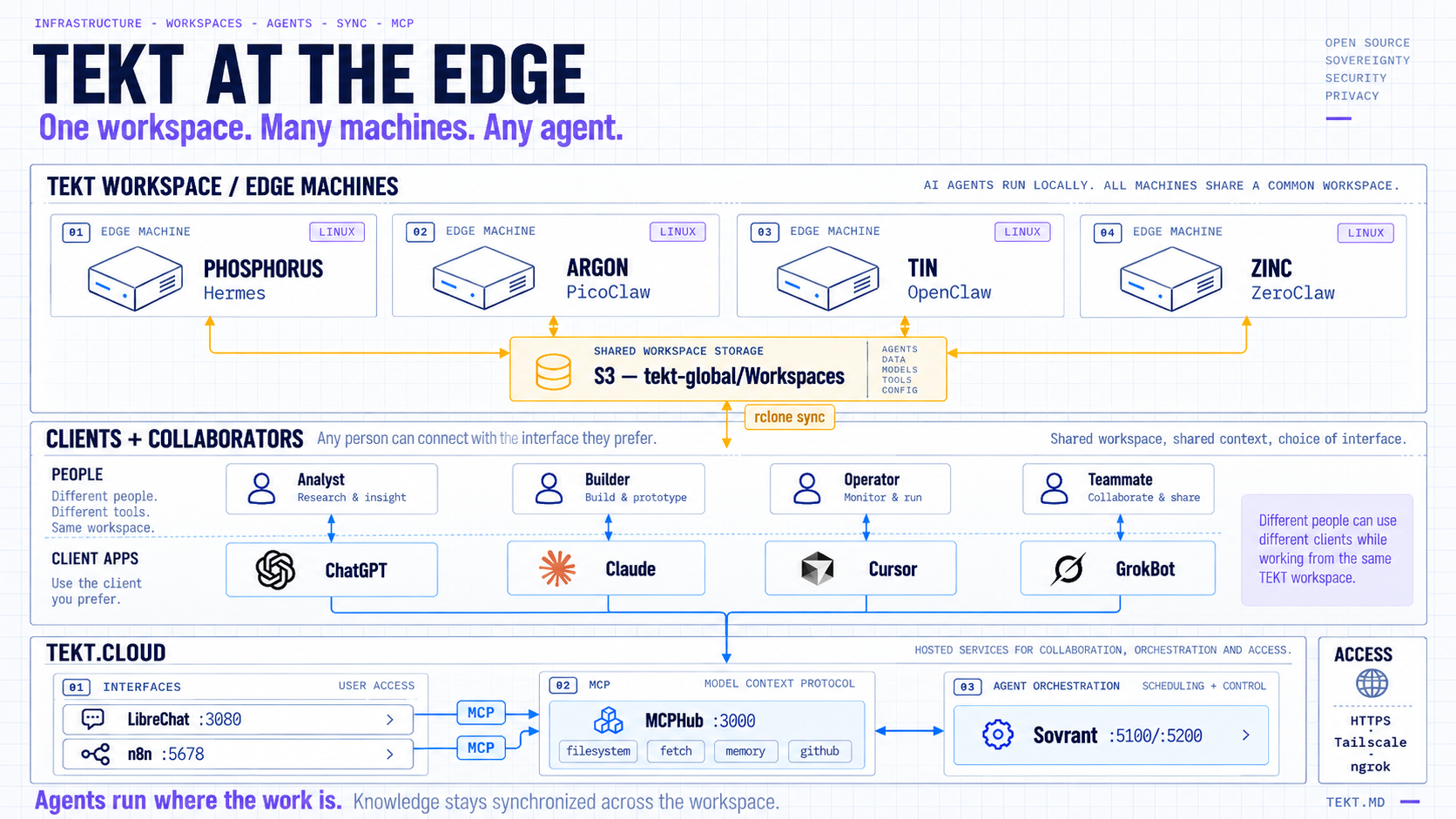
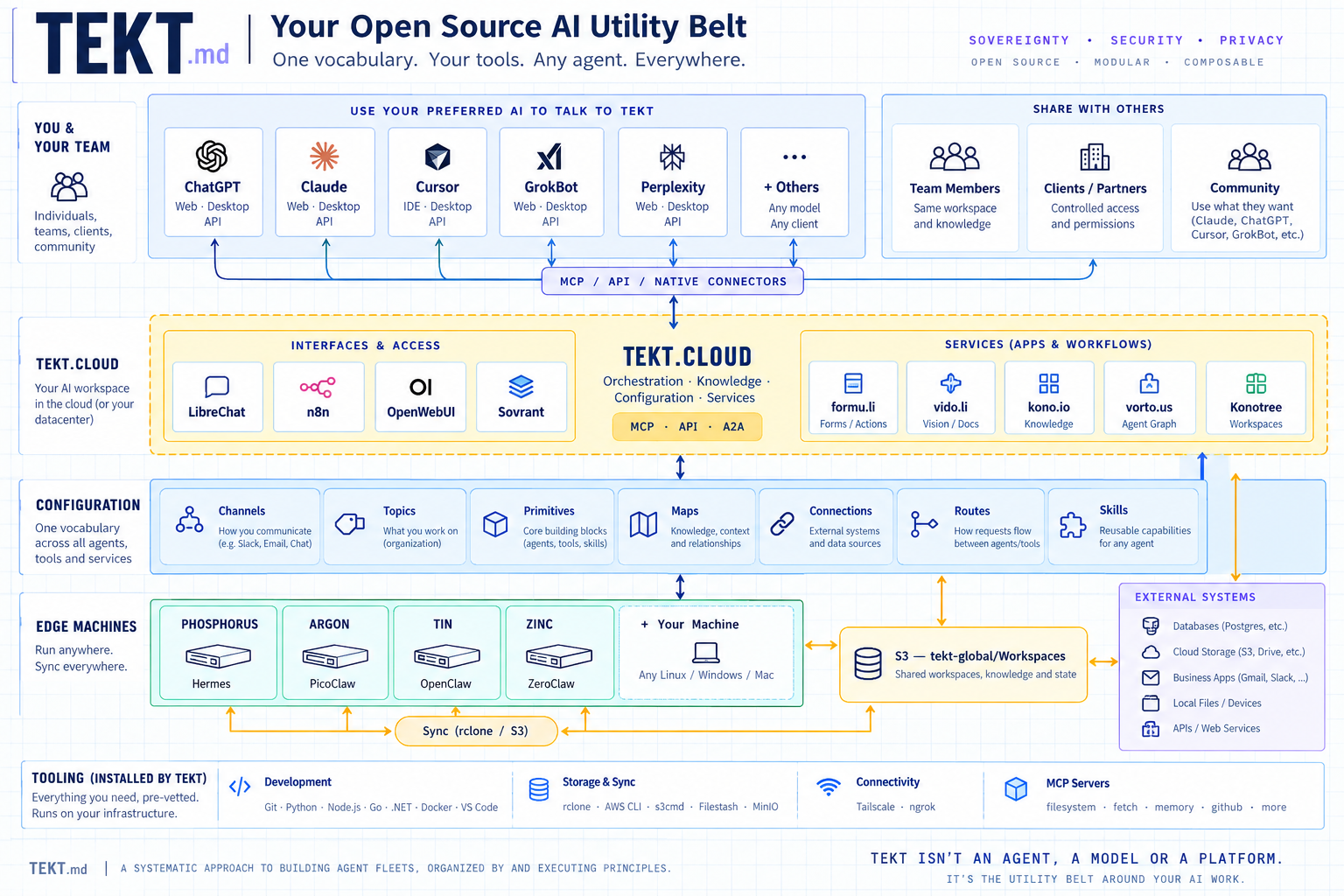
Easy AI at the edge. Tekt sets up an AI sandbox on your Linux or Windows machine so agents can do real work for you. It is an open-source utility belt for AI engineers: a hand-curated catalog of tools, agents, MCP servers and skills. It brings the best of open source and SaaS, already picked and vetted, so you don't have to choose. One script installs it on infrastructure you own, and you bring your own intelligence. Builders get a workbench ready to go. Operators get a stack they can run and share. Managers get a clear view of what the agents are doing. Sovereignty · Security · Privacy.
Browse every shelf at tekt.md/catalog, or read the source of truth: tekt.catalog.yaml.
flowchart LR
  Bootstrap["Bootstrap<br/>install.sh / install.ps1"] --> Dev["Tekt.Dev<br/>Git · Go · Python · Node · VS Code · Docker"]
  Dev --> Base["Tekt.Base<br/>rclone · AWS CLI · MinIO"]
  Base --> Edge["Tekt.Edge<br/>Tailscale · ngrok"]
  Edge --> Iris["Tekt.Iris<br/>Ollama · Agent runtimes · MCP servers"]
  Iris --> Cloud["Tekt.Cloud<br/>MCPHub · LibreChat · n8n · Sovrant"]
Tekt is a catalog, not a product: every entry is someone else's excellent work, credited explicitly. What Tekt adds is the curation (what earns a place on a shelf), the composition (the arkitype), and a bootstrap that takes you from a blank machine to a working edge/cloud stack in one sitting.
Who it's for
| What you get | Start with | |
|---|---|---|
| Builders & AI engineers | A ready AI sandbox: toolchain, local models, agent runtimes and MCP tools installed in one pass, so the first hour goes to your idea | bash install.sh, then claude — see 03 — Software |
| Operators | A stack you can keep running: workspace sync, a private Tailscale network, one status check, HTTPS sharing in one command | bash install.sh status · bash install.sh share 3080 — see 01 & 02 |
| Managers | A clear view of the work: chat (LibreChat) and workflows (n8n) in any browser, plus a plain-language plan of what is installed and why | The shared chat URL from your operator · the plan in 00 — Arkitype · UIs in 04 — Interface |
Why it's different
Tekt isn't an agent, a model, or a platform, and it doesn't want your prompts or your data. It's the utility belt around them. It helps you manage the four things every AI harness has, gets you started, and keeps different agents in sync through shared communications and knowledge tools. Every tool is pre-vetted and runs on your own infrastructure.
| Your harness needs | What that means | Where it lives in Tekt |
|---|---|---|
| Metadata | What's installed, where, which version, and who made it | tekt.catalog.yaml, bash install.sh status |
| Structure | How machines, agents and tools fit together | The arkitype layers 00 – 04 |
| Processes | How agents hand work to each other and to people | MCPHub, n8n, LibreChat |
| State | One workspace and memory every agent can read and write | rclone → S3 workspace sync, Tailscale mesh, memory MCP |
Bring your own intelligence
Tekt ships no model and no keys. Point your agents at whichever provider you choose, by API or through the provider's own client:
| Provider | How you connect | Notes |
|---|---|---|
| Ollama | Local, no key | Open-weight models on your hardware; Tekt installs it |
| OpenRouter | API key | Hundreds of hosted models behind one OpenAI-compatible endpoint |
| OpenAI | API key, or the Codex CLI | GPT models |
| Anthropic | API key, or Claude Code / Claude Desktop | Claude models |
Wire any of them into LibreChat, n8n, or an agent runtime's config. Tekt only connects them.
Share with your people
Git is too technical, and S3 is too much work. Your people already use Google Drive, OneDrive, Dropbox, Box, Nextcloud or a shared folder, so a Tekt Space uses that. It's a folder on your computer that stays in sync with the storage you pick, laid out the same way for everyone: docs/ for documents, knowledge/ for notes worth keeping, and skills/ for AI skills.
tekt space add team drive     # sign in to Google Drive in your browser, and that's it
tekt space autosync on        # sync every 10 minutes in the background
tekt connect                  # let your AI apps (Claude Code, Claude Desktop, Codex) use it
Share the Tekt/team folder from Google Drive the way you share anything, then run tekt space invite team. It writes the invitation (how to accept the folder, install Tekt and join) and copies it to your clipboard. From then on you both, and both your AIs, work from the same files. Skills travel the same way. Drop a skill folder into skills/, or run tekt skill new team summarize, and after the next sync it shows up in everyone's Claude Code. Full guide: tekt.md/spaces.
Roadmap
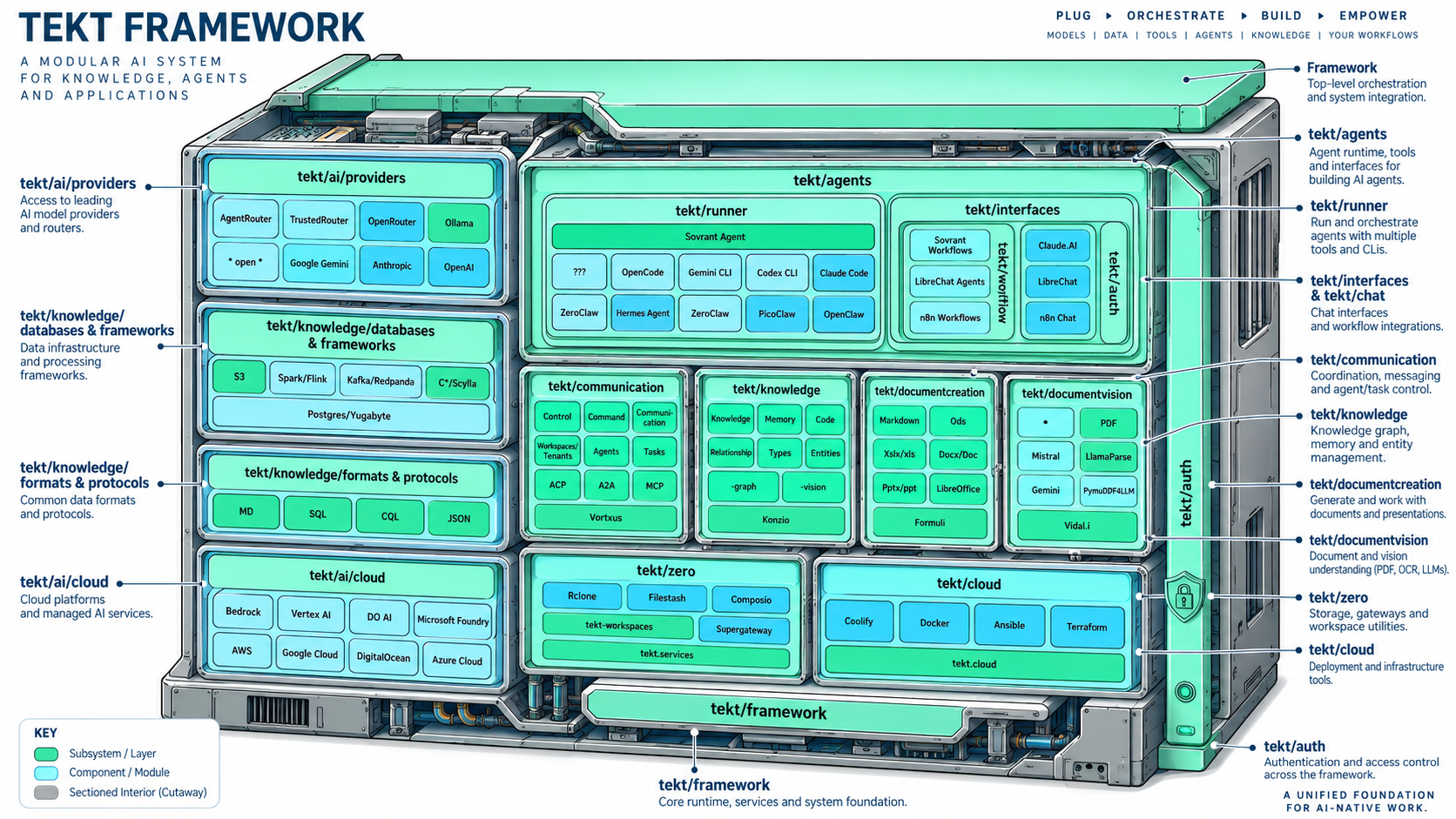
Where the belt is headed: a modular framework of providers, knowledge, agents, communication and cloud. You plug in the models, then orchestrate, build and empower your own workflows. The iteration-by-iteration plan is in .manage/2026.09.10.iterations.plan.md.
Quick Start
Curl (macOS / Linux / WSL2):
curl -fsSL https://tekt.md/install.sh | bash
PowerShell (Windows):
irm https://tekt.md/install.ps1 | iex
The PowerShell installer refreshes PATH as it goes, so you should not need to pause and restart between steps. If a newly installed command still is not visible after the script finishes, open a new PowerShell window and run .\install.ps1 status.
Git:
git clone https://github.com/xingh/tekt.md
cd tekt.md
bash install.sh          # or: .\install.ps1
VirtualBox (pre-built VM):
An OEM Linux Mint distribution by Rahul Singh with most prerequisites pre-installed. It boots in VirtualBox (or any compliant VM system) and walks you through setup like a brand-new computer.
- Install Oracle VirtualBox
- Download the TEKT VM here
- After initial setup:
cd ~/Tools/tekt.md
git pull
bash install.sh
Supported platforms: macOS (Intel + Apple Silicon), Ubuntu/Debian, Fedora/RHEL, Arch Linux, WSL2, Windows (PowerShell).
After the install
tekt space add team drive    # share a folder with your AI and your people (Drive, OneDrive, Dropbox…)
tekt space autosync on       # keep your Spaces in sync every 10 minutes
tekt connect                 # let Claude Code, Claude Desktop and Codex use your Spaces
tekt space invite team       # write an invitation for your colleagues (copied to the clipboard)
tekt tool add memory team    # give your AI apps a memory that lives in the team Space
bash install.sh status       # what landed, layer by layer
bash install.sh mcp          # MCPHub + 4 curated MCP servers → :3000
bash install.sh ui           # LibreChat → :3080, n8n → :5678
bash install.sh share 3080   # HTTPS-share a UI (Tailscale Serve, else ngrok)
bash install.sh catalog      # print the tool catalog
The installer also puts a tekt command on your PATH, so the same subcommands read tekt status, tekt space add, tekt mcp, tekt ui, tekt share. Type tekt help to see them all.
The Documentation Path
Five documents take you from composition to a shared, working home-lab stack:
| # | Doc | What it covers |
|---|---|---|
| 00 | Arkitype | The composition spec — layers, archetypes, topology, signal flow |
| 01 | Infrastructure | Git, Homebrew, Go, Python, Node, VS Code, Docker, Tailscale, ngrok |
| 02 | Database | rclone, AWS CLI, s3cmd, s5cmd, MinIO, Postgres+pgvector, workspace layout |
| 03 | Software | Ollama + the seven agents + MCPHub with the curated MCP servers |
| 04 | Interface | LibreChat & n8n UIs, wiring them to MCP, proxies, sharing from your home lab |
What Gets Installed
Tekt.Dev — Development Environment
| Tool | Version | Purpose | Upstream |
|---|---|---|---|
| Git | latest | Version control — required first (Homebrew depends on it) | git-scm.com |
| GitHub CLI | latest | Issues, pull requests and releases from the terminal (gh auth login) |
GitHub |
| Homebrew | 5.x | Package manager for macOS/Linux | Homebrew maintainers |
| Go | 1.26.2 | Runtime for Tekt-native tools | The Go Authors |
| Python | 3.14 via pyenv | Scripting, ML tooling, Python agents | PSF / pyenv contributors |
| nvm / Node.js | Node 24 LTS | JS runtime; OpenClaw & npm MCP servers | OpenJS / nvm contributors |
| VS Code | latest | Primary editor | Microsoft |
| Docker + Compose | latest | Runs the entire tekt.cloud layer | Docker, Inc. |
Tekt.Base — Data, Storage & Sync
| Tool | Purpose | Upstream |
|---|---|---|
| rclone | S3 & consumer-cloud workspace sync (Google Drive, OneDrive, …) | Nick Craig-Wood & contributors |
| AWS CLI v2 | Cloud storage & workspace management | Amazon Web Services |
| s3cmd | Batch S3 ops, alt providers (B2, R2, MinIO) | s3tools.org |
| s5cmd | Very fast parallel S3 transfers | Peak |
| MinIO (optional) | Self-hosted S3 — the sovereign bucket | MinIO, Inc. (AGPL) |
Tekt.Edge — Network & Exposure
| Tool | Purpose | Upstream |
|---|---|---|
| Tailscale | Private WireGuard mesh across your nodes; HTTPS via tailscale serve |
Tailscale Inc. |
| ngrok | Instant public HTTPS tunnels for demos & webhooks | ngrok, Inc. |
Tekt.Iris — Intelligence
| Tool | Purpose | Upstream |
|---|---|---|
| Ollama | Local open-weight models — the sovereignty baseline | Ollama (MIT) |
| Claude Code | Agentic coding CLI | Anthropic |
| Claude Desktop | Desktop app for Claude on macOS, Windows, and Linux (beta: Ubuntu/Debian) | Anthropic |
| Zed (Agent mode) | Local code editor with built-in AI agent workflows | Zed Industries |
| OpenClaw | Full agentic workspace runtime (Node) | OpenClaw contributors |
| PicoClaw | Single Go binary for $10 edge hardware | Sipeed |
| Hermes Agent | Self-improving agent + messaging gateway (no native Windows) | Nous Research |
| ZeroClaw | Rust runtime, <5MB RAM, ~10ms cold start | zeroclaw-labs contributors |
| Nanobot | Ultra-light Python agent with WebUI & MCP | HKUDS (MIT) |
| NanoClaw | Container-isolated agents on the Claude Agent SDK (staged; setup via Claude Code) | qwibitai (MIT) |
| Codex CLI | OpenAI's coding agent in the terminal | OpenAI (Apache-2.0) |
| opencode | Open-source terminal coding agent for any provider | anomalyco & contributors (MIT) |
| crush | Charm's terminal AI assistant | Charm (FSL-1.1-MIT) |
| pi | Minimal, extensible terminal coding agent for any provider | earendil-works & contributors (MIT) |
| omp (oh-my-pi) | pi with the IDE wired in: LSP, debugger, subagents, shared sessions | can1357 & contributors (MIT) |
OpenClaw onboarding is intentionally deferred during bootstrap to keep install non-interruptive: run openclaw onboard --install-daemon when ready.
On Windows, restart PowerShell after installer runs, then verify with .\install.ps1 status.
Tekt.Cloud — Chat, Workflows & Command Center
Scaffolded by the installer, started on demand (mcp / ui):
| Tool | Port | Purpose | Upstream & license |
|---|---|---|---|
| MCPHub | 3000 | One hub aggregating your MCP servers into a single streamable-HTTP endpoint | samanhappy & contributors (Apache-2.0) |
| LibreChat | 3080 | Multi-model chat UI, MCP-connected | Danny Avila & contributors (MIT) |
| n8n | 5678 | Workflow automation, MCP client and server | n8n GmbH (Sustainable Use License — fair-code, not OSI open source) |
| Sovrant | 5100 / 5200 | .NET 10 command center for agents — desktop, web, OpenAI-compatible server, MCP server mode; the installer clones and builds it | Anant Corporation (BSL 1.1 — source-available, not OSI open source; converts to Apache-2.0 on 2029-05-15) |
The curated MCP servers
bash install.sh mcp brings up MCPHub with four local servers — filesystem, fetch, memory, github — working in your instance workspace (~/Tekt/Instances/<host>/workspace) and exposed at http://localhost:3000/mcp. Four is the default, not the limit: swap or add servers in mcp_settings.json (hot-reloaded), and put HTTPS in front with bash install.sh share 3000. Details: 03 — Software.
Prerequisites
- macOS: Xcode Command Line Tools (
xcode-select --install) - Linux:
curl,sudoaccess - Windows: winget (App Installer); WSL2 recommended for full parity
- All: ~10 GB free disk, a reliable connection, and (optionally) API keys for hosted models — or none at all if you go all-local with Ollama
Customizing
Version pins and repo URLs live in tekt.catalog.yaml — edit it next to the script and both installers pick up the pins. To skip a tool, comment out its call in main(). The catalog is also the honest ledger of upstream creators and licenses; if you redistribute Tekt, keep it intact.
Architecture Reference
Tekt/
├── Global/
│   └── Workspaces/              ← synced from S3 via rclone / s5cmd
└── Instances/
    └── <hostname>/
        ├── workspace/           ← what local agents & MCP servers see
        ├── mcp/                 ← MCPHub config + compose
        ├── cloud/               ← LibreChat / n8n / MinIO / Postgres stacks
        ├── agents/              ← NanoClaw and other source-staged agents
        └── sovrant/             ← command center (.NET 10 source build)
Full topology, archetypes, and signal flow: 00 — Arkitype.
Troubleshooting
The most common fix for everything: open a fresh terminal (PATH caching). The Windows PowerShell installer refreshes PATH during the run, so this is usually only needed after the script exits. Per-tool troubleshooting now lives in the doc for its layer — 01, 02, 03, 04. Still stuck? bash install.sh status tells you exactly what's missing, and every install function prints its manual fallback commands when it fails.
Contributing
Issues and PRs welcome at github.com/xingh/tekt.md.
Credits
Tekt exists because of the people who build the tools it composes. Every entry in tekt.catalog.yaml carries an upstream: field naming its creators — that field is load-bearing. Particular thanks to the maintainers of Git, Homebrew, Go, Python/pyenv, nvm/Node, VS Code, Docker, rclone, the AWS/S3 tool authors, Tailscale, ngrok, Ollama, Anthropic (Claude Code & the MCP reference servers), the OpenClaw community, Sipeed (PicoClaw), Nous Research (Hermes), zeroclaw-labs, HKUDS (Nanobot), qwibitai (NanoClaw), samanhappy (MCPHub), Danny Avila (LibreChat), and n8n GmbH.
Maintained by Anant Corporation